
All in One View
Content from Welcome
Last updated on 2026-10-23 | Edit this page
Estimated time: 30 minutes
Overview
Questions
- How does this bonus module complement the existing Instructor Training?
Objectives
- Summarise the experience and perspectives of the participants in this session.
- Summarise the topics that will be covered in this bonus module.
Note: Some of the content on this page is adapted from The Carpentries Instructor Training curriculum.
A template Etherpad for the training is available. Make a copy and encourage the participants to contribute to shared notes there.
Pronouns and Names
Using correct names and pronouns (e.g. “she/her”) is important for setting a respectful tone. Learning these is hard to do quickly, so we recommend displaying it prominently during the training.
In an online training, give everyone a moment to update their display name to reflect how they would like to be addressed.
At an in-person event, we recommend supplying name tags and markers, or using plain paper to create table-displayed name placards.
Note that pronouns are personal and some participants might prefer not to share them. Do not force people to share their pronouns. One reason to avoid pressuring people to share them is to allow people to share their gender identity only when they feel ready to. It is, however, necessary for all participants to use pronouns and names as listed when participants provide them.
The resources below can provide additional guidance on respectful pronoun usage:
- The proper use of pronouns in language: https://lgbt.ucsf.edu/pronounsmatter
- The importance of using pronouns: https://www.pronouns.org/
- How to use personal pronouns: https://www.pronouns.org/how
- How to deal with situations when you use the wrong pronoun: https://www.pronouns.org/mistakes
Code of Conduct
To make clear what is expected, everyone participating in The Carpentries activities is required to abide by our Code of Conduct. Any form of behaviour to exclude, intimidate, or cause discomfort is a violation of the Code of Conduct. In order to foster a positive and professional learning environment we encourage you to:
- Use welcoming and inclusive language
- Be respectful of different viewpoints and experiences
- Gracefully accept constructive criticism
- Focus on what is best for the community
- Show courtesy and respect towards other community members
If you believe someone is violating the Code of Conduct, we ask that you report it to The Carpentries Code of Conduct Committee by completing this form.
Introductions
Hello everyone, and welcome to The Carpentries Bonus Module to Instructor Training on adapting to genAI use by learners in a workshop. We are very pleased to have you with us.
This Event’s Trainers
To begin class, each Trainer should give a brief introduction of themselves.
(For some guidelines on introducing yourself, see some content from the Introductions section of Instructor Training.)
Why Develop This Bonus Module?
Opinions on genAI models and tools vary widely within The Carpentries community. Many Carpentries community members have strong and justified concerns about negative environmental, societal, legal, and personal impacts of the development and use of genAI tools. Others are excited by the prospect of new tools they expect will lower the barrier to generating source code.
We have developed this Bonus Module in response to reports from Instructors of widespread use of genAI tools like chatbots during workshops. The technology has become established, learners’ behaviours have shifted, and we want to empower the Instructor community to engage with these shifting conditions.
Now, we would like to get to know all of you.
Temperature Check
For the multiple choice questions below, please place an “X” next to the response(s) that best apply to you.
-
Have you observed learners/students using genAI tools during
a workshop or another teaching setting? If so, how
widespread would you estimate this use was?
- I have not taught recently.
- I have not observed learners using these tools.
- A minority of learners used these tools.
- About half of learners used these tools.
- The majority of learners used these tools.
- (Nearly) every learner used these tools.
-
How often do you use genAI tools in your own work?
- Never
- Rarely
- Monthly
- Weekly
- Daily
-
How helpful or unhelpful do you think genAI tools are for
novices learning to code?
- Very helpful
- Helpful
- Neither helpful or unhelpful / it depends
- Unhelpful
- Very unhelpful
What Is Motivating You?
What is your primary motivation for joining this bonus module session? What are you most hoping to gain from the session? Write a short response into the Etherpad.
The relatively rapid and widespread adoption of genAI tools by learners and students is having a profound impact on education. We currently lack research insights, backed up by data from robust, controlled studies, to inform a new approach to teaching workshops. Instead of presenting proven strategies for Instructors to adopt in their workshops, this Bonus Module refers to the key concepts that underpin the Instructor Training curriculum and examines the implications of genAI tools in that context. Through a series of exercises and facilitated discussions, participants will explore the potential impacts on learners of genAI tool use and strategies they could pursue to ensure that our workshops continue to empower those learners to adopt good practices. Although we cannot yet provide guidance backed by strong evidence, we recommend some approaches that Instructors can adopt in their workshops and identify points where uncertainty remains.
- This Bonus Module refers to the key concepts that underpin the Instructor Training curriculum and examines the implications of genAI tools in that context.
Content from Modes of Interaction with GenAI
Last updated on 2026-10-23 | Edit this page
Estimated time: 10 minutes
Overview
Questions
- What does the current landscape of genAI tools for coding look like?
- What AI tools are researchers and programming novices typically using?
Objectives
- Summarise the different modes of interaction that currently exist for AI-assisted coding.
- Identify which of these modes are most likely to be used by members of the target audience for our workshops.
Acknowledgement
Some of the content in this episode is adapted from Code Refinery’s Responsible Use of Generative AI in Assisted Coding (licensed CC-BY 4.0).
AI coding assistance comes in many forms. Here is an overview of the different ways that users interact with these tools.
Dialogue with a chatbot
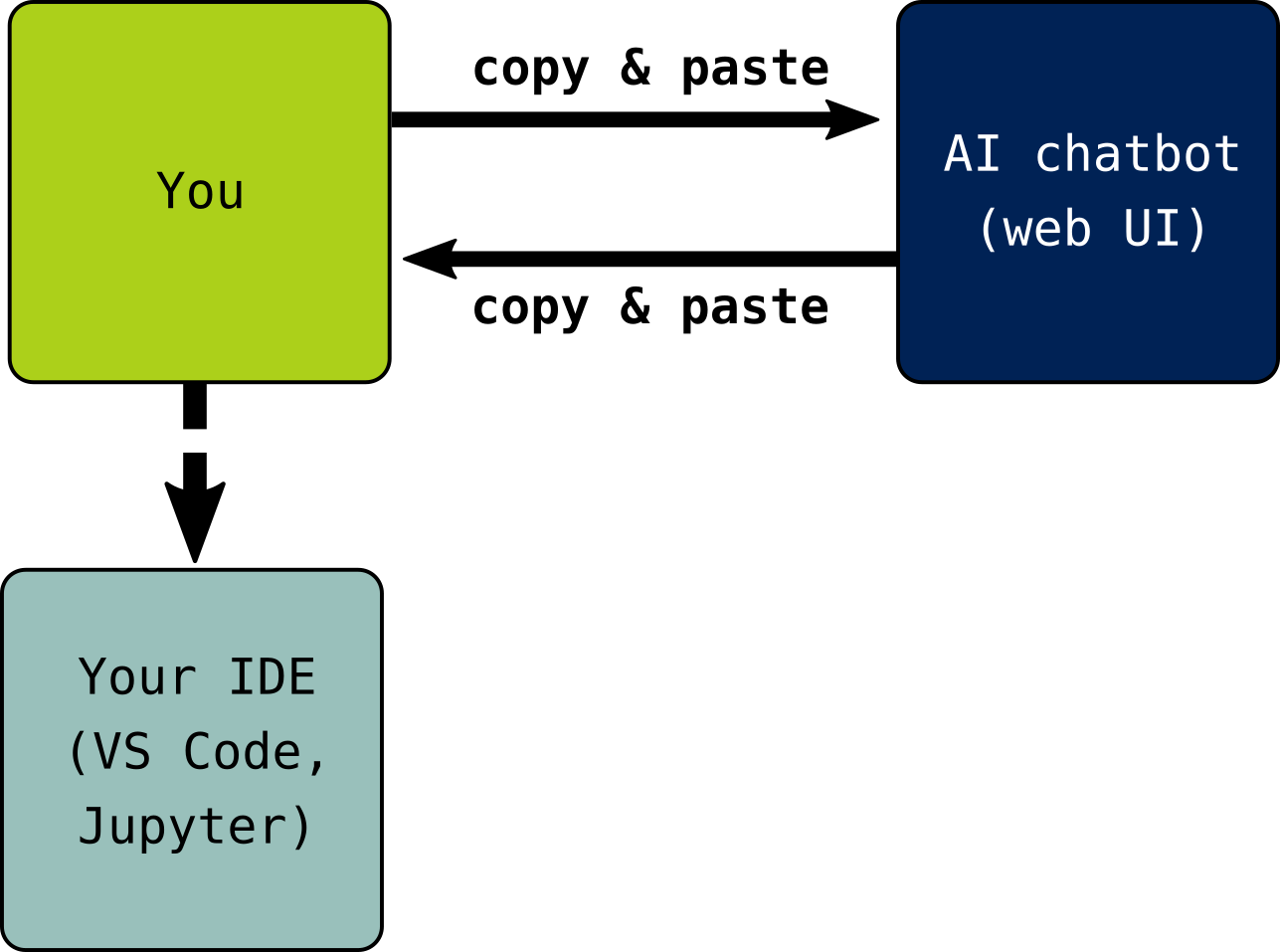
The most widely-used mode of interaction with genAI models is the chatbot. Most users interact with a chatbot via an app or web interface. Conversations generally consist of back-and-forth exchanges of relatively short messages. Some chatbot tools have access to a compute environment and the ability to run tools, search the internet, etc, while others are more limited.
IDE integrations
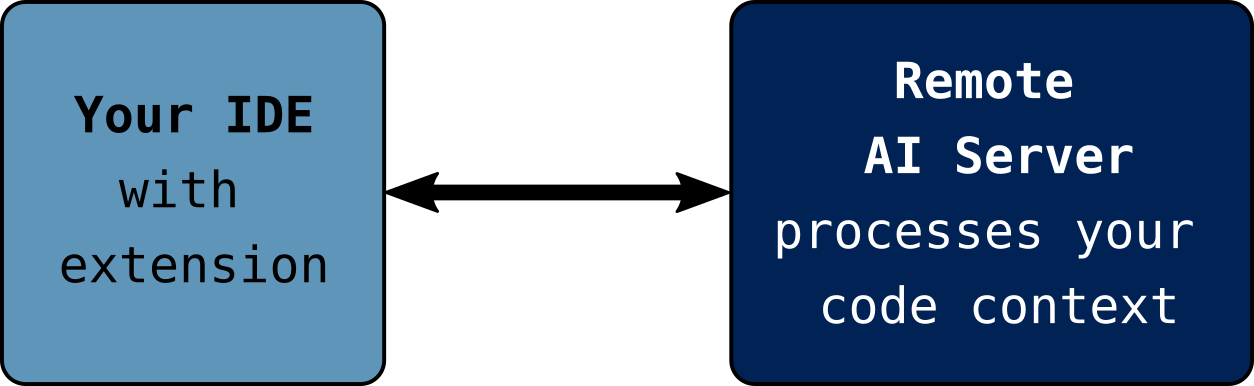
Another mode of interaction for those developing software is the use of a genAI model via an extension or features of an integrated development environment (IDE). In this case, the model processes the files in the project you are working on in the IDE and includes that information in its context window. (Roughly speaking, the model’s context window is its working memory of information relevant to the whatever response it will produce next.) Through the IDE, the model can suggest auto-completion, e.g., of a function body based on the docstring that has been written, and provides a chat interface for prompts. There are genAI extensions available for most IDEs, as well as some “AI first” IDEs that boast more extensive integration.
Agentic Coding Tools
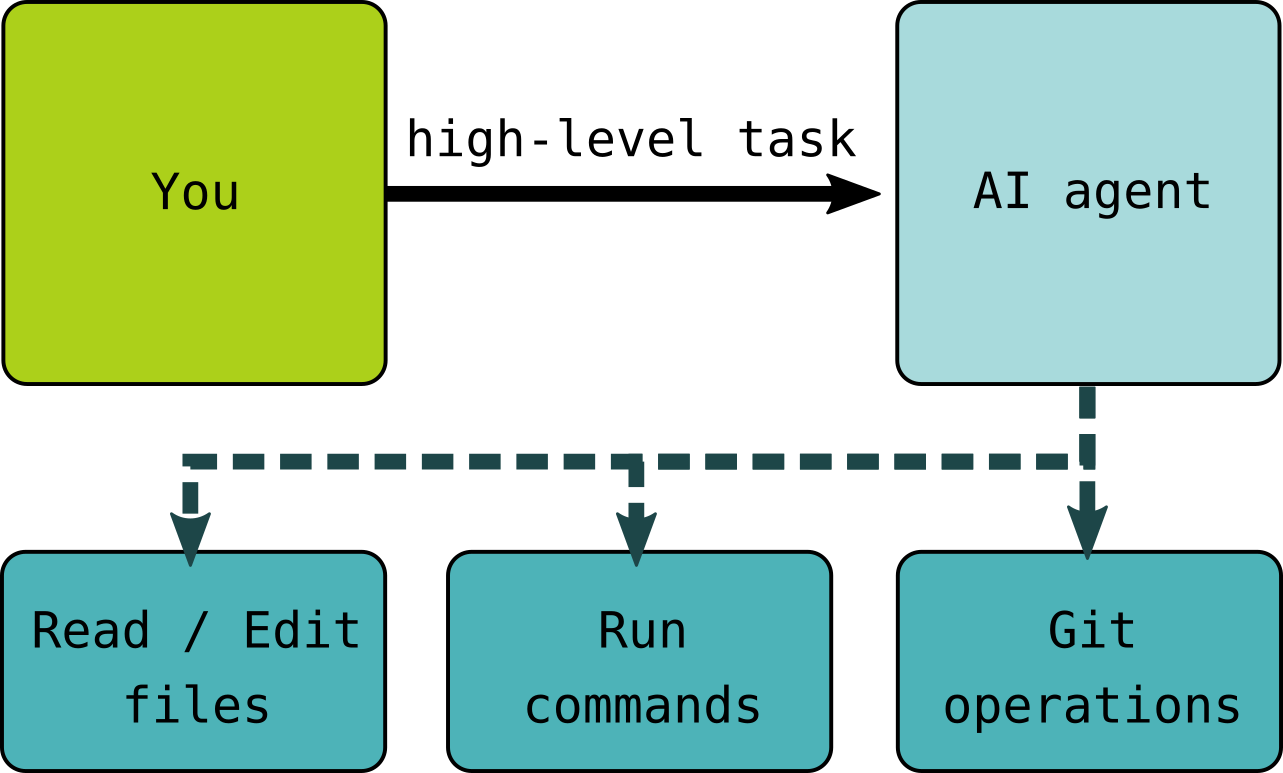
The final mode of interaction discussed here is the operation of coding agents. These are applications that allow the model to directly use tools, executing commands on the system and processing feedback from those commands (e.g., reading error messages and the contents of output files). The user provides a description of the task they want to achieve to the agent, which processes those instructions and acts on the user’s behalf. The agent may read and write files, including new programs, run commands on the system, process feedback, potentially run new commands based on the results, and so on until it gets stuck, is interrupted, or determines that the task has been completed.
This is the most powerful mode of interaction and the mode with the highest risk, since the model can act quickly in ways that affect the system it is running on.
In reality, AI coding tools exist on a spectrum with many hybrids, and the boundaries are blurry between these modes of interaction. For example, some browser-based chat interfaces are now similar to locally-run agent tools, running in a cloud-hosted environment where they have the ability to install and run tools. Review Code Refinery’s resource, The Full Spectrum of AI Coding Tools for an extended taxonomy.
Furthermore, the rate of change in AI (coding) tools is extremely fast, and access to the most advanced tooling is unequally distributed. We try to discuss the usage of these tools in general during this training, but the most appropriate actions to take in your workshops may differ depending on your local context.
What Are Learners Using?
The technological landscape is evolving quickly, with new tools and models appearing very frequently. In this context, it can be difficult to access hard data that could provide insights into what people are using and how.
In survey results published in April 2026, O’Brien and colleagues reported that the vast majority of scientists who reported using genAI to assist programming in their research were using a chatbot (mostly ChatGPT) as their primary tool (O’Brien et al 2026). Experience reports shared by Carpentries Instructors and other educators also suggest that chatbots are the primary mode of engagement for learners.
While some learners may be trying out more specialised tools intended for AI-assisted software development (e.g., Cursor and Claude Code), the current focus of this bonus module will be on learners’ use of chatbots in workshops.
- People are using chatbots, IDE integrations, and coding agents to assist with software development and data analysis.
- Data is scarce and the landscape is constantly shifting, but at the moment it seems that chatbots are the most common mode of engagement with genAI for our target learners.
Content from Building Skill with Practice
Last updated on 2026-10-23 | Edit this page
Estimated time: 25 minutes
Overview
Questions
- What are the implications of genAI tool use for guided practice among novice learners?
- How good are current genAI tools at producing solutions to the exercises in Carpentries lessons?
Objectives
- Explore the capabilities of genAI tools in the context of Carpentries lessons.
- Discuss how genAI tool use could impact skill acquisition for novice learners.
- Discuss how widespread use of genAI tools for code generation might affect the relative importance of the skills we teach.
Guided practice is a central principle of Carpentries Instructor Training. We provide learners with guided practice during a workshop and equip them with sufficient expertise to continue guiding their own practice after they leave. Novices need this initial guided instruction because they do not have sufficient expertise to know what they do not know or to articulate what they want to do.
GenAI chatbots may be unhelpful to novices who want to learn a new topic because:
- They may produce responses that do not account for the learner’s lack of expertise.
- They often over-cater to the prompt they were given: providing additional information, taking additional steps, and suggesting next steps that may be jumping too far ahead.
- They can reliably generate correct snippets of code, including solutions to most if not all of the exercises in our lessons.
However, novices are unable to assess the quality of a generated solution. Are there other ways that they could be encouraged to use genAI tools, to better support their learning?
How Good is GenAI at Solving Carpentries Exercises?
Choose one of the suggested lessons in the spoiler below. Try passing the text of some of the exercises from your chosen lesson to duck.ai or another genAI chatbot of your choice.
- How many exercises from the lesson was the chatbot able to solve?
- Did you find any exercises that the chatbot could not solve?
When reporting your results, include details of any custom settings you used on the chatbot. How might those have affected the output you received? Similarly, did you need to provide any additional information to the chatbot? E.g. upload example data, paste extra content from elsewhere in the episode, etc.
General notes:
- At the time of writing, some chatbots do not support uploading of csv files (e.g. duck.ai). For lessons with csv datasets, you could try describing the dataset, pasting in the first several lines of data, or using a chatbot that supports csv uploads (e.g. Claude.ai).
- Some lessons don’t work well for this exercise because they require more specialized set-up than there is time available for this exercise. However, many exercises in these lessons can still be completed by genAI tools once the setup is accomplished. If you have extra time, feel free to test them, and think about whether an additional steps you needed to take could realistically be expected of learners in a workshop.
The following lessons work well for this exercise:
- Data Carpentry:
- Library Carpentry:
- Software Carpentry:
- HPC Carpentry:
The following lessons don’t work as well for this exercise:
- Data Carpentry:
- Foundations of Astronomical Data Science
- Data Organization in Spreadsheets for Ecologists
- Data Organization in Spreadsheets for Social Scientists]
- Data Cleaning with OpenRefine for Ecologists
- Data Cleaning with OpenRefine for Social Scientists
- Introduction to the Command Line for Genomics
- Data Wrangling and Processing for Genomics
- Introduction to Cloud Computing for Genomics
- Introduction to Geospatial Concepts
- Introduction to Geospatial Raster and Vector Data with R
- Library Carpentry:
- HPC Carpentry:
The above exercise has demonstrated that chatbots will often provide correct responses to the types of challenges we pose to learners during our workshops. Previous experience has also shown us that the tools are quite consistent in the solutions they produce to these relatively small and introductory exercises, but some variation in responses can be assumed.
What Does This Change?
How does the ability of genAI tools to generate source code influence the relative importance of the following different skills to a novice learning to program?
- Writing a syntactically valid for loop.
- Tracing the order of execution.
- Choosing descriptive names for variables.
- Debugging, e.g., interpreting error messages.
Referring back to your answers, what is one approach you could take as an Instructor during a workshop to (de)emphasise the importance of one or more of the skills listed above?
We’ve demonstrated that chatbots are able to generate technically correct solutions for many Carpentries-style exercises. However, many of the code solutions generated introduce new pieces of syntax that haven’t been covered in the lesson yet, and may be accompanied by explanatory text that invokes concepts and terminology that learners have not yet encountered. We will discuss this challenge in the next episodes.
- Novices using chatbots in a workshop are less likely to benefit from guided practice.
- Current chatbot tools can produce functioning solutions to many exercises in Carpentries lessons.
Content from Expertise and Instruction
Last updated on 2026-10-23 | Edit this page
Estimated time: 20 minutes
Overview
Questions
- How does a user’s expertise affect their use of genAI tools?
- What can Instructors do to discourage learners from relying on chatbots to solve exercises during a workshop?
Objectives
- Explore the influence of expertise on the use of genAI tools and the quality and interpretation of their output.
- Recognise the importance of a user’s mental model in guiding and taking responsibility for output generated by an AI model.
Many (research) software engineers have concluded that genAI tools are now sufficiently effective and reliable for code generation that they no longer need to do much programming by hand. These experts report that they have found ways of working with genAI tools that leverage their expertise.
Despite widely publicised claims that anybody can now code using genAI, novices are unlikely to achieve equivalently good results. Novices lack a mental model for conceptualising and articulating what they want to achieve, how it could be achieved, how it could go wrong, etc.
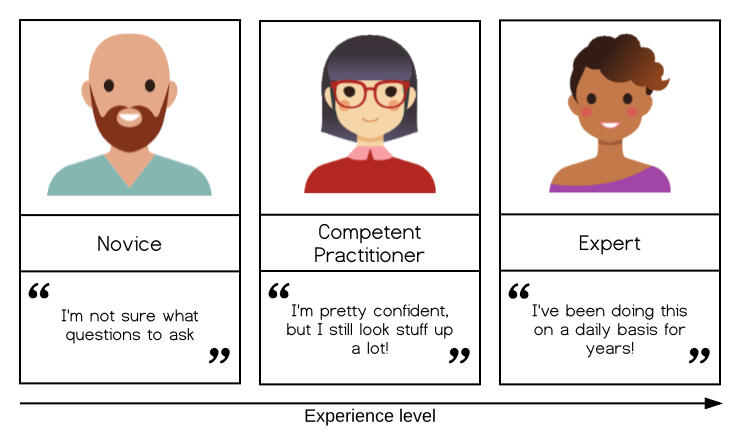
Of course, these novices may not expect to achieve the same results as an expert. They may be motivated to use genAI tools because they feel that it will help them produce better results, faster than they could do on their own.
Conceptual understanding and knowledge of relevant terminology are essential for learners to be able to articulate what they want to achieve, and to process the responses they receive. This is comparable to how the use of relevant terminology in search terms is likely to produce more relevant internet search results. But the model of skill acquisition tells us that the barrier is more than a limited vocabulary: one characteristic of a novice is that they do not know what they do not know. This means that a novice cannot articulate what they want to do, because they may not yet know what it is.
To keep improving the results they receive, and take responsibility for AI-generated outputs, learners must build their own expertise.
In a study of secondary school pupils in China, published in 2026, Stromberg, Lei, and Wu found that AI use offers immediate benefits to students in terms of homework completion time and the quality of work produced, followed by growing negative impact on exam scores (where no AI was allowed). No penalty to exam scores was observed among students who did not adopt AI in their work. Those students who adopted AI but did not take less time over their homework achieved similar exam scores to those students who did not adopt AI, but almost none of those who adopted AI saw an improvement in exam scores.
How Relevant Is This To Our Teaching?
Learners at Carpentries workshops are typically adults, as opposed to the secondary school students studied by Stromberg, Lei, and Wu. How relevant do you think their findings are to our workshops?
Some differences between workshops and secondary school education that might affect relevance:
- Learner motivation
- Exercises are completed “in class” rather than as homework
- Workshop Instructors are not responsible for grading learners
One challenge that Instructors now report encountering in workshops is that some learners will choose to copy and paste the text of an exercise into a chatbot, then copy and paste the code it produces back out again, to “solve” the exercise.
Copying/pasting Exercises
What are some ways that you might notice that students are copy/pasting the exercises in a workshop, instead of attempting them themselves? Suggest one strategy that an Instructor could employ to discourage or prevent learners from doing this.
Indications of an AI-generated solution include:
- Use of functions, syntax, language features, etc. that have not yet been introduced in the workshop.
- Complex code (more on this later).
- An abundance of comments explaining the lines of code.
- Inability for the learner to explain how the solution works.
Strategies suggested by Trainers include:
- Explain the importance of exercises for learning (transfer from working to long-term memory, metacognition)
- Celebrate the successful, manual completion of an exercise.
- Ask learners to explain their solutions.
- Follow up an exercise by asking learners to make small modifications to change the behaviour of their solutions.
(Note to Trainers: if you receive more suggestions from participants while delivering this bonus module, please open a pull request to add them to the curriculum.)
User Roles and Education
Richards et al 2026 identified five interaction modes among programmers using genAI tools:
- Navigator uses genAI to find their way around the code base.
- Autopilot asks genAI to solve their problems completely automatically.
- Deputy uses genAI incrementally to advance collaboratively toward a solution.
- Technician is similar to Deputy, but uses smaller, more granular changes that are carefully reviewed.
- Scholar uses genAI to explain concepts or provide information support.
There is an emerging consensus that Autopilot mode has the most drawbacks, both in the short term (generated solutions may be plausibly wrong) and long term (users will learn the least). Scholar and Navigator modes may have the best benefit-to-drawback ratio, as they increase the user’s knowledge rather than supplanting it. Once some expertise has been developed, Technician mode is often a step toward Deputy, and that progression should be encouraged.
Keep in mind that all of this is provisional and subject to change.
- A user needs a working mental model of a domain in order to articulate what they want to achieve and to evaluate the results they get from an AI tool.
- Instructors should encourage learners to develop their own expertise and avoid giving up their agency to genAI tools.
Content from Memory and Cognitive Load
Last updated on 2026-10-23 | Edit this page
Estimated time: 55 minutes
Overview
Questions
- How could learners’ use of chatbots influence considerations of cognitive load in a workshop?
Objectives
- Assess the suitability of chatbot responses to a novice learner’s understanding.
- Articulate a personal view of what chatbot use should be encouraged in a workshop.
Sweller’s model describes three categories of cognitive load: intrinsic, germane, and extraneous. Our goal as Instructors (and Lesson Developers) is to eliminate extraneous cognitive load. But intrinsic and germane cognitive load remain. That is, some cognitive load is unavoidable and essential for learning. This is desirable cognitive load, but the friction can feel difficult for learners.
GenAI tools offer a tempting alternative, giving learners the opportunity for “cognitive offloading”. But if this eliminates or reduces germane cognitive load, the learner is less likely to retain the relevant information required for learning.
Similarly, and referring back to the previous episode, if they offload parts of the process that promote learning, they will benefit very little from participating in the workshop. Exercises are a great example: practicing new skills and applying new concepts facilitates the transfer of this information from learners’ working memory to their long-term memory. Completion of exercises also promotes metacognition: a learner’s awareness that they are learning, which itself promotes further learning. If learners feed the exercises straight into a chatbot, they are much less likely to learn what is being taught.
Carpentries lessons and the exercises within them have been carefully designed to help Instructors manage learners’ cognitive load throughout a workshop. In many cases, there will be more than one possible way to solve an exercise. But learners cannot be expected to have all of the conceptual knowledge required to devise some of these possible solutions.
For example, a Python exercise might be solved in one line with a list comprehension or a lambda function, but the lesson uses neither because a more easily interpretable solution is required for novice learners.
Chatbot Responses and Cognitive Load
Refer back to an earlier exercise, where you tried to solve an exercise from one of our lessons with a chatbot. Consider the code that the chatbot produced.
- What strengths and weaknesses do you observe in the chatbot’s solutions?
- What reasoning are you using to evaluate or classify them?
- Would a novice learner be able to use the same reasoning to evaluate the response?
- Does the solution produced by the chatbot include additional complexity, concepts, etc. that could be distracting (introducing extraneous cognitive load) for a novice learner?
An example, using an exercise in the Software Carpentry Programming with R lesson:
Write a function
plot_distthat plots a boxplot if the length of the vector is greater than a specified threshold and a stripchart otherwise. To do this you’ll use the R functionsboxplotandstripchart.
The solution provided in the lesson:
R
plot_dist <- function(x, threshold) {
  if (length(x) > threshold) {
    boxplot(x)
  } else {
    stripchart(x)
  }
}
A solution produced by duck.ai:
R
plot_dist <- function(x, threshold = 30, main = NULL, xlab = NULL, ylab = NULL, ...) {
  if (!is.numeric(x)) stop("x must be numeric")
  if (is.null(main)) main <- deparse(substitute(x))
  if (is.null(xlab)) xlab <- ""
  if (is.null(ylab)) ylab <- ""
  n <- length(x)
  if (n > threshold) {
    boxplot(x, main = main, xlab = xlab, ylab = ylab, ...)
  } else {
    stripchart(x, method = "jitter", vertical = TRUE, pch = 16,
    main = main, xlab = xlab, ylab = ylab, ...)
  }
}
Chatbot Responses and Cognitive Load, Continued
Now try repeating the same prompt used above, but add
I am a novice learning to program for the first time.
What effect, if any, did this have on the complexity of the solution produced? If the response is still too complex, can you adjust the prompt further to make it more helpful to a novice?
A common observation is that the addition of this information about the learner’s level of expertise produces responses with less complex code and a lot of additional explanation. While the code in these responses tends to be easier for learners to understand, the responses themselves are longer, often include multiple different options/implementations, and may be overwhelming for a novice. Carpentries workshops are deliberately paced slowly and structured to manage cognitive load for novice learners.
Instructors may choose to advise learners to provide information about their level of expertise, the contents of the workshop(s) they have participated in, and other relevant context when prompting an AI tool for help with their coding tasks after they leave the workshop.
Copy-Paste vs Peeking at the Solution
Several of our exercises have been concerned with learners copy/pasting exercises to produce solutions with a chatbot. However, our lessons are publicly and freely available to visit online, and many exercises on these pages include solutions. In your opinion, what if any difference is there between a learner pasting the text of an exercise into a chatbot and trying out the code that is produced in response, and the learner expanding the solution box on the lesson webpage and pasting the code they find there into their environment?
What is Acceptable?
*Take a few minutes to think about your answer to the following questions:
- Is it possible for novice learners to use a genAI chatbot in a workshop, without threatening their ability to learn the skills we aim to teach?
- If so, what would that use look like?
Make some notes, then pair with a partner. Compare your answers, and discuss any points where you disagree.
Finally, share the key points of your discussion with the rest of the group. Did you reach a consensus? If not, on what points did you disagree?
- Chatbot use that removes germane cognitive load may impede learning.
Content from Building Skill with Feedback
Last updated on 2026-10-23 | Edit this page
Estimated time: 30 minutes
Overview
Questions
- How might learners’ use of genAI tools impact the pathways and mechanisms of feedback in a workshop?
Objectives
- Identify possible impacts of genAI chatbot use on the established feedback mechanisms in a workshop.
- Discuss how Instructors can encourage learners to continue to provide feedback in a workshop while interacting with a chatbot.
Feedback Mechanisms
What is one way that a learner receives feedback on their work or understanding during a workshop? How might the learner’s use of a chatbot disrupt that feedback mechanism?
What is one way that an Instructor receives feedback on learners’ understanding during a workshop? How might the learner’s use of a chatbot disrupt that feedback mechanism?
Feedback mechanisms for learners include:
- Exercises and worked solutions.
- Comments from Instructors, Helpers, and other workshop participants.
- Their impressions of their own ability to keep up with the pace of instruction, understand what is being taught, etc.
Feedback mechanisms for Instructors include:
- Sticky note feedback.
- Facial expressions and demeanors of learners.
- Results of exercises and other assessments.
- Questions asked and explanations given by learners.
One challenge that learners’ use of genAI tools presents to a workshop is that it removes a crucial pathway of feedback to the Instructor. If a learner turns to a chatbot for help before they turn to a helper or Instructor, the Instructor will never know what question they had, what they were finding difficult, or where they were stuck. This means the Instructor cannot identify trends in what the class is finding difficult and misses the opportunity to clarify the key points.
This is another reason why it is so important to create and maintain a positive learning environment in a workshop. If Instructors and helpers appear approachable to learners, encouraging them to speak up when they are stuck and to share what they are getting from genAI tools if/when they use them, these feedback pathways are more likely to stay open. Nevertheless, you and your helpers may make all of these efforts and still observe learners using a chatbot before talking to a human.
How Can We Encourage Feedback?
How could Instructors encourage learners to speak to them or a helper before resorting to a chatbot? What strategies could Instructors implement in a workshop to encourage learners to be open about when and how they are using genAI while they learn? Can you identify any ways that learners’ use of genAI could be harnessed as a teaching opportunity in a workshop?
Strategies that you could try to encourage learners to ask questions to helpers and Instructors rather than a chatbot during a workshop include:
- Explain the importance of questions and discussion feedback to you, and how that feedback influences your approach throughout the workshop. (Refer to Setting Expectations at a Workshop below.)
- Use pair programming and small group discussion for more exercises. These formats will encourage discussion among learners and may make them hesitate and ask one another when they are unsure before they refer to a chatbot.
The availability of answers from a chatbot means that it is more important than ever for us to create and maintain a positive learning environment in our workshops. If learners perceive the Instructors and helpers to be patient, friendly, and approachable (as well as knowledgable and capable of providing accessible answers), they will be more likely to turn to them when they get stuck.
The way that you acknowledge and respond to your own mistakes can be a model of behaviour for learners to follow. The fallibility of the Instructor can be inspiring to learners who may be reluctant to acknowledge when they do not know or understand something they feel that they should.
Setting Expectations at a Workshop
Address the use of chatbots directly and early in your workshops, and set expectations with your learners about how to make the most of the workshop. Set aside a few minutes during the workshop introduction to cover some or all of the following points:
- Summarise the key points from Instructor Training about how learning
works, and use these to discourage the use of chatbots during the
workshop.
- Expertise is built through guided practice, and exercise must be challenging to be useful.
- Instructors will manage learners’ cognitive load throughout the workshop: the order and pacing is deliberate to help learners build a mental model so that they can continue to learn after they leave.
- Motivation is essential for learning: encourage learners to identify and connect with their motivation for joining the workshop.
- Feedback (to the learner and the Instructor) is an essential element of the workshop to ensure learning.
- Explain that the benefit that learners get from the workshop will be proportional to the effort they put into it: the more they apply themselves to the tasks and discussions in the workshop, the more they will develop their own ability, independent of any technological aids.
- Emphasise that questions are welcome and even encouraged. Introduce the helpers and co-Instructors and try to provide some details that will encourage learners to refer to them when they need. Explain how questions asked by one learner are often shared by others, and that the answers will probably benefit everyone.
- Explain the value of learning the basics in the workshop to learners who are keen to start using AI tools to generate their code: the foundational mental model that they will acquire by engaging with the workshop will help them make more effective use of AI assistance afterwards.
- The key takeaways from the Stromberg et al paper make a compelling case for learners not to use AI to help them complete exercises.
- Combine this overview of your expectations of learners with a discussion of what they can expect from you in return.
- It can be difficut to gather helpful feedback if learners are using a chatbot instead of requesting assistance from Instructors and helpers.
- Being explicit about your expectations of learners and they ways they should/should not use AI tools in the workshop.
Content from How Not to be Wrong About AI
Last updated on 2026-06-29 | Edit this page
Estimated time: 30 minutes
Overview
Questions
- Why are most claims about the impact of AI on productivity not reliable?
- What methods would be more reliable?
- What can we practically do in a classroom setting?
Objectives
- Explain why obvious measures of programming productivity are misleading.
- Describe how standard scientific research methods could provide less ambitious but more reliable answers.
- Explore a practical alternative to those methods that can be used in the classroom.
In 2023, GitHub announced their tools made developers 55% faster (Peng et al 2023). That number appeared in every executive presentation for a year. This episode teaches you how to tell if you should believe it or not.
Evaluating Claims
Claims can be evaluated from several angles:
- Conclusion validity: Was the sample large enough? Are effect sizes reported?
- Internal validity: Was there a control group? Was assignment random? Could novelty or learning effects explain the result?
- Construct validity: Does the measurement actually capture the claim?
- External validity: Who are the subjects, and are they representative of the population the conclusions address?
This is all Research Methods 101, particularly for people in disciplines like psychology or medicine. However, most undergraduate programs in computer science don’t teach research methods, so most programmers don’t even know what they don’t know. At the same time, most organizations (even ones staffed by scientists) don’t have the time or funding to look at themselves this carefully.
Why Productivity is Hard to Define
Manufacturing productivity means widgets per hour: both terms are measurable. But software output is not homogeneous: a ten-line bugfix may be worth more than a thousand-line feature. An entire book basically says “measuring programmers’ productivity is really hard” over and over again (Sadowski and Zimmerman 2019). One reason is that much of software work is invisible: a field study found developers only spend 25% of their day actually writing code (Meyer et al 2017). Reading, reviewing, and helping colleagues doesn’t show up in simple metrics.
The first question we need to ask is whether the measurement actually captures the concept? Lines of code written per day fails this test: you can write more lines by making code worse. Most other simple measures fail as well, but that doesn’t stop companies from publishing claims based on them:
- Timing artificial tasks: a 90-minute greenfield task (i.e., one that starts with an empty file and builds something from scratch) does not predict real work, which almost always involves understanding and modifying existing code.
- Measuring only the easy half: AI makes code generation faster, but this doesn’t take into account review time, time spent debugging confidently wrong suggestions, and time spent addressing security vulnerabilities.
- Before/after measures with no control group: you cannot separate the effect of AI from the effects of other things that changed (such as hiring new team members, changes to infrastructure, etc.).
- Asking developers if they feel more productive: feeling productive is not the same as being productive, and the novelty effect inflates self-reports for weeks.
- Comparing people who volunteer to try a new tool or technique to those who do not: early adopters are usually already higher performers, and again, the novelty effect produces misleading results on a timescale of weeks.
Minimum Viable Rigour
So what can we tell about the impact of AI? One place to look for an answer is User Experience (UX) research, which has also had to deal with a myriad confounding factors, accelerated timescales, and the need to find something actionable. UX researchers sometimes distinguish two kinds of evaluation:
Formative evaluation means studying something in order to improve it. This can be done effectively with small samples, rapid iteration, and a qualitative focus; “what is wrong?” not “how often?”
Summative evaluation is the assessment of whether something works in general. It requires more participants, controlled conditions, and quantitative metrics.
You may have identified parallels to the distinction between formative and summative evaluation for assessing learning. User experience groups in industry use the term “guerilla research” for formative evaluation, and have developed rough-and-ready techniques for getting something useful with the time and resources they have Hall (2019). For example, Nielsen and Landauer (1993) found that a think-aloud session with five participants is typically enough to identify most problems in a specific workflow for a specific user group.
In the Classroom
As instructors, you have the opportunity to run a formative evaluation session each time you teach with AI coding tools. For example, you could ask learners to verbalize their thoughts as they work: “say out loud whatever you are thinking”. It is most useful to do this on a concrete task, not open exploration, so that you and learners can compare experiences, and so that there is a direction or purpose to the learner’s thinking. For example, you could tell learners, “Given this pull request, use the AI assistant to write a one-paragraph summary of the changes.” When you are doing this:
- Pay particular attention to where participants hesitate, backtrack, or state expectations that turn out to be wrong.
- Do not help when they get stuck: you want to observe their reasoning process before trying to extend or correct it.
- Summarize observations at the end and have other learners compare with their own experience.
Practicing This Exercise
Work in groups of 3. One person builds a script to find duplicate files (i.e., files with identical content but different names) in or below a directory (searching recursively) - the motivation is that it will be used to detect redundant copies of datasets. They use an AI coding assistant while thinking aloud for at most 5 minutes. The others watch and take notes.
At the end, compare the observers’ notes to each other and to the subject’s recollection of what they thought they were doing.
What would you tell the next person to do (in particular, to do differently) based on what you observed?
- There is no generally-accepted way to measure the productivity of programmers, which makes measuring the impact of AI on productivity problematic.
- Most of the claims being made about AI’s impact would not pass scrutiny in an introductory course on research methods.
- Guerilla research methods used by User Experience researchers, such as think-aloud protocols, can reveal opportunities for improvement in specific workflows for specific users.
Content from Wrap-up
Last updated on 2026-06-10 | Edit this page
Estimated time: 40 minutes
Overview
Questions
- How should Carpentries workshops change to account for the use of genAI tools?
Objectives
- Discuss what the most effective teaching approach might be in the future.
We have revisited some of the key principles from Instructor Training, exploring what access to genAI chatbots means for novice learners’ opportunities for guided practice and management of cognitive load. We have discussed strategies that Instructors could adopt to engage learners on the topic of chatbot use and to encourage them to continuing building their own expertise.
As we finish up this bonus module, it is worth spending some time thinking about other ways that our workshops might need to change if the current trend of genAI tool adoption continues.
Participatory Live Demo with GenAI
What would participatory live demonstration look like with the Instructor using a genAI chatbot? In your opinion, what would be some advantages and disadvantages of this approach to teaching, compared to AI-free methods?
What Are The Essential Skills Now?
Consider the key skills that we teach in a Data Carpentry, HPC Carpentry, Library Carpentry, or Software Carpentry workshop. How, if at all, should these skills and the ways we teach them change in the context of widespread genAI use?
- What do we really want learners to be able to do when they leave a workshop?
- What practices do we want them to adopt?
- What becomes more important? What could be de-prioritised?
- Are major changes now necessary to the curriculum for these workshops?
Final Reflection
Considering what you have learned and ideas you have gathered through participation in this training, make a list of things you are going to try in your next workshop.
- The way people code is changing but many of the good practices we aim to teach remain as important as ever.